
The Mathematical functions evaluate mathematical data.
This function accepts a numerical value X as input and returns the absolute value of the number as the output.
Syntax:
| process eval("identifier=abs(X)")
Example:
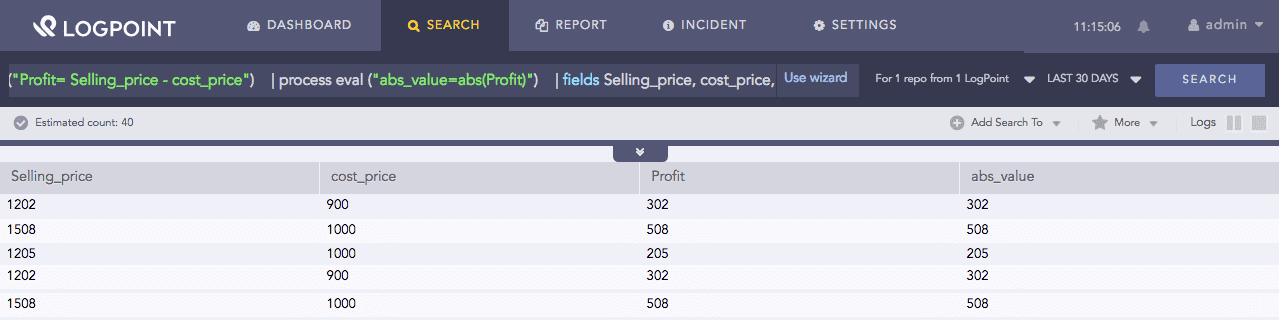
| process eval ("Profit= Selling_price - cost_price")
| process eval ("abs_value=abs(Profit)")
| fields Selling_price, cost_price, Profit, abs_value
The above example first calculates value for a Profit field. It then computes the absolute value of the Profit field and returns its value in the abs_value identifier.
The fields command displays the value of Selling_price, cost_price, Profit, and abs_value in a tabular form.
Abs function
This function accepts a numerical value X as input and returns the greatest integer less than or equal to X.
Syntax:
| process eval("identifier=floor(X)")
Example:
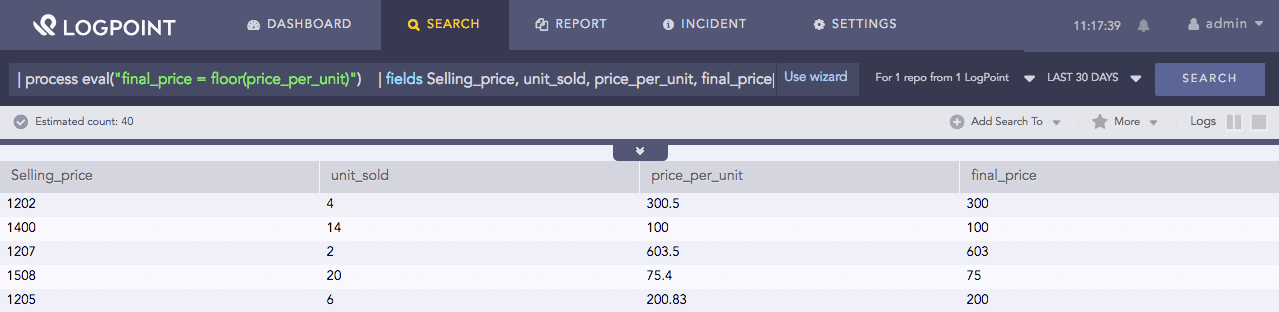
| process eval("price_per_unit=Selling_price/unit_sold")
| process eval("final_price = floor(price_per_unit)")
| fields Selling_price, unit_sold, price_per_unit, final_price
The above example first calculates value for a price_per_unit field. It then computes the greatest integer less than or equal to the value of Profit field and returns its value in the final_price identifier.
The fields command displays the value of Selling_price, cost_price, Profit, and abs_value in a tabular form.
Floor function
This function accepts a numerical value X as input and rounds the number up to the smallest following integer value.
Syntax:
| process eval("identifier=ceiling(X)")
Example:
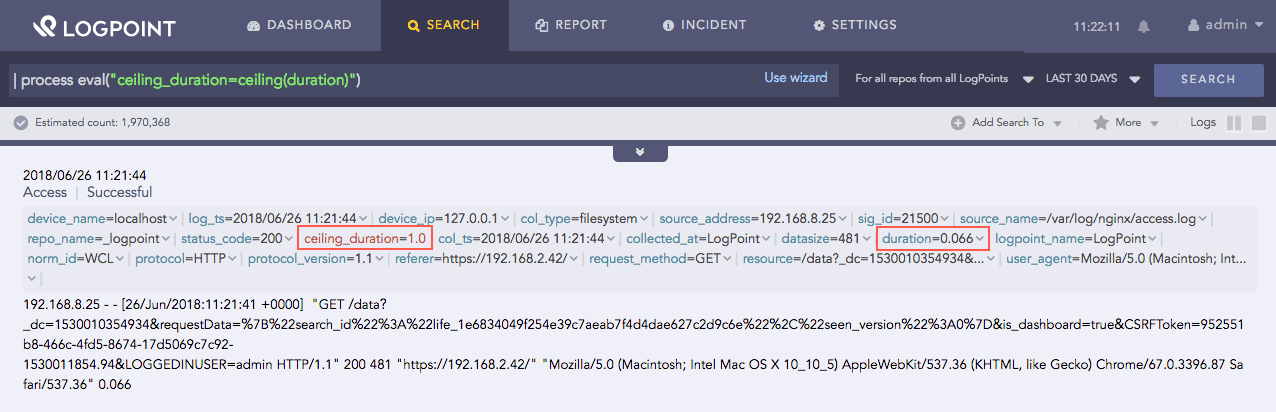
| process eval("ceiling_duration=ceiling(duration)")
The above example accepts the value of the duration field and returns the smallest following integer value in the ceiling_duration identifier.
Ceiling function
This function accepts a numerical value X as input and evaluates the exponentiation with base e and X as the exponent, i.e., \(e^X\). You can also use the function expe instead of the function exp.
Syntax:
| process eval("identifier=exp(X)")
or
| process eval("identifier=expe(X)")
Example:
| process eval("result=exp(discount)") | fields discount, result
or
| process eval("result=expe(unit_sold)") | fields unit_sold, result
The above example evaluates the exponentiation to the base e of the discount field and returns it in the result identifier.
The fields command displays the value of discount and result in a tabular form.

Exp function

Expe function
This function accepts a numerical value X as input and evaluates the exponentiation with base 2 and X as the exponent, i.e., \(2^X\).
Syntax:
| process eval("identifier=exp2(X)")
Example:
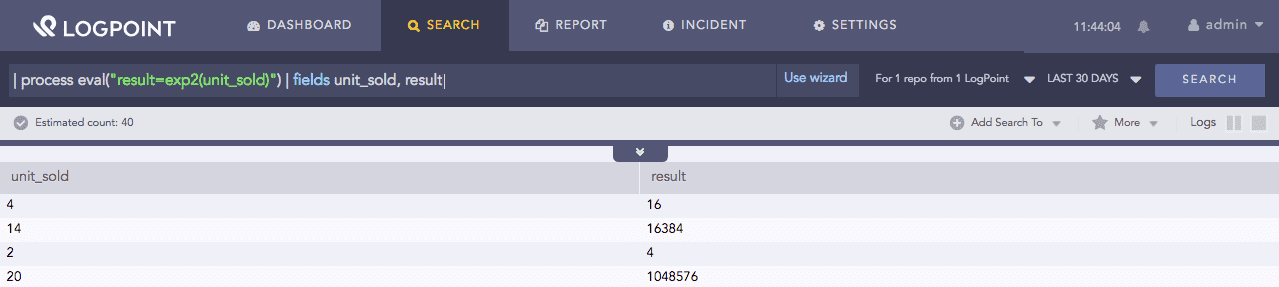
| process eval("result=exp2(unit_sold)") | fields unit_sold, result
The above example evaluates the exponentiation to the base 2 of the unit_sold field and returns it in the result identifier.
The fields command displays the value of unit_sold and result in a tabular form.
Exp2 function
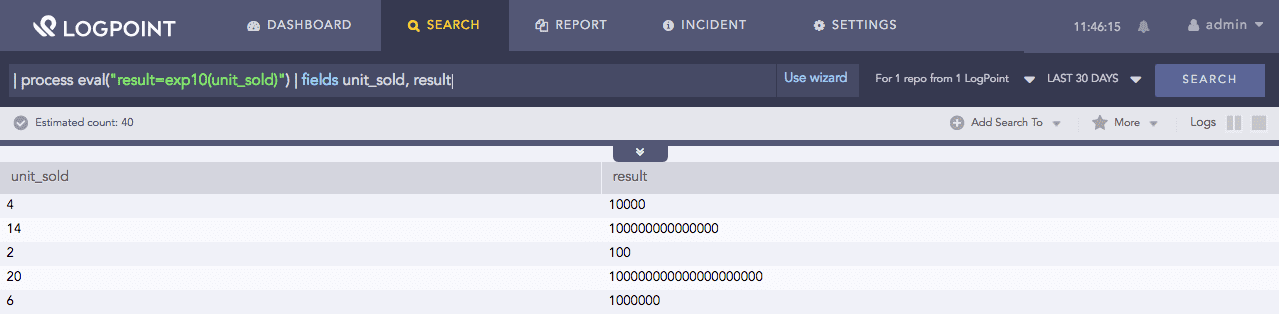
This function accepts a numerical value X as input and evaluates the exponentiation with base 10 and X as the exponent, i.e., \(10^X\).
Syntax:
| process eval("identifier=exp10(X)")
Example:
| process eval("result=exp10(unit_sold)") | fields unit_sold, result
The above example evaluates the exponentiation to the base 10 of the unit_sold field and returns it in the result identifier.
The fields command displays the value of unit_sold and result in a tabular form.
Exp10 function
This function accepts a numerical value X as input and evaluates the logarithm of X with base e, i.e., \(log_e(X)\). You can also use the function loge instead of the function log.
Syntax:
| process eval("identifier=log(X)")
or
| process eval("identifier=loge(X)")
Example:
| process eval("result=log(unit_sold)") | fields unit_sold, result
or
| process eval("result=loge(unit_sold)") | fields unit_sold, result
The above example evaluates the logarithm to the base e of the unit_sold field and returns it in the result identifier.
The fields command displays the value of unit_sold and result in a tabular form.

Log function

Loge function
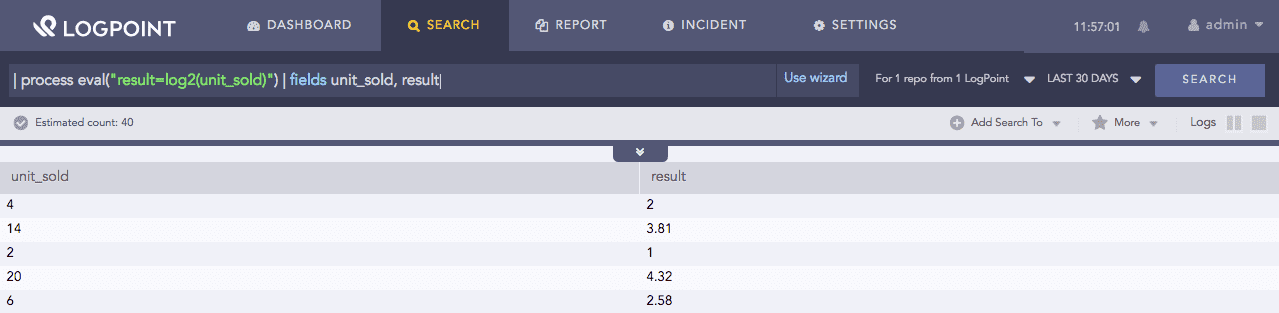
This function accepts a numerical value X as input and evaluates the logarithm of X with base 2, i.e., \(log_2(X)\).
Syntax:
| process eval("identifier=log2(X)")
Example:
| process eval("result=log2(unit_sold)") | fields unit_sold, result
The above example evaluates the logarithm to the base 2 of the unit_sold field and returns it in the result identifier.
The fields command displays the value of unit_sold and result in a tabular form.
Log2 function
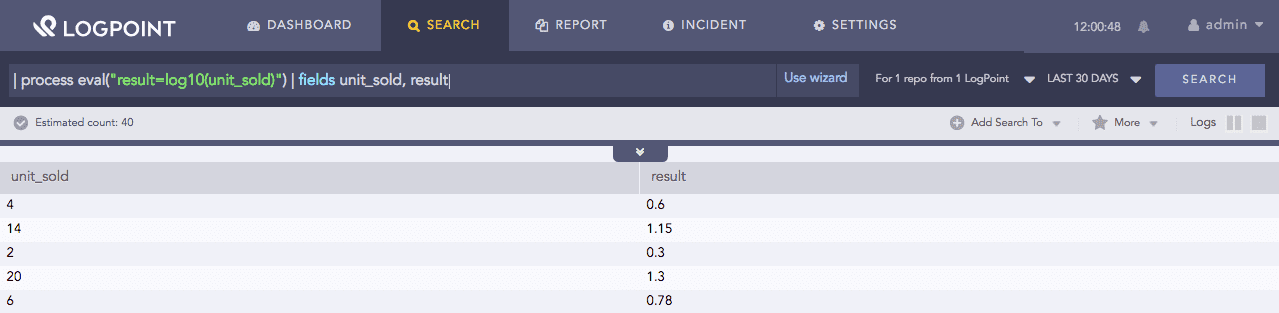
This function accepts a numerical value X as input and evaluates the logarithm of X with base 10, i.e., \(log_{\mathrm{10}} (X)\).
Syntax:
| process eval("identifier=log10(X)")
Example:
| process eval("result=log10(unit_sold)") | fields unit_sold, result
The above example evaluates the logarithm to the base 10 of the unit_sold field and returns it in the result identifier.
The fields command displays the value of unit_sold and result in a tabular form.
Log10 function
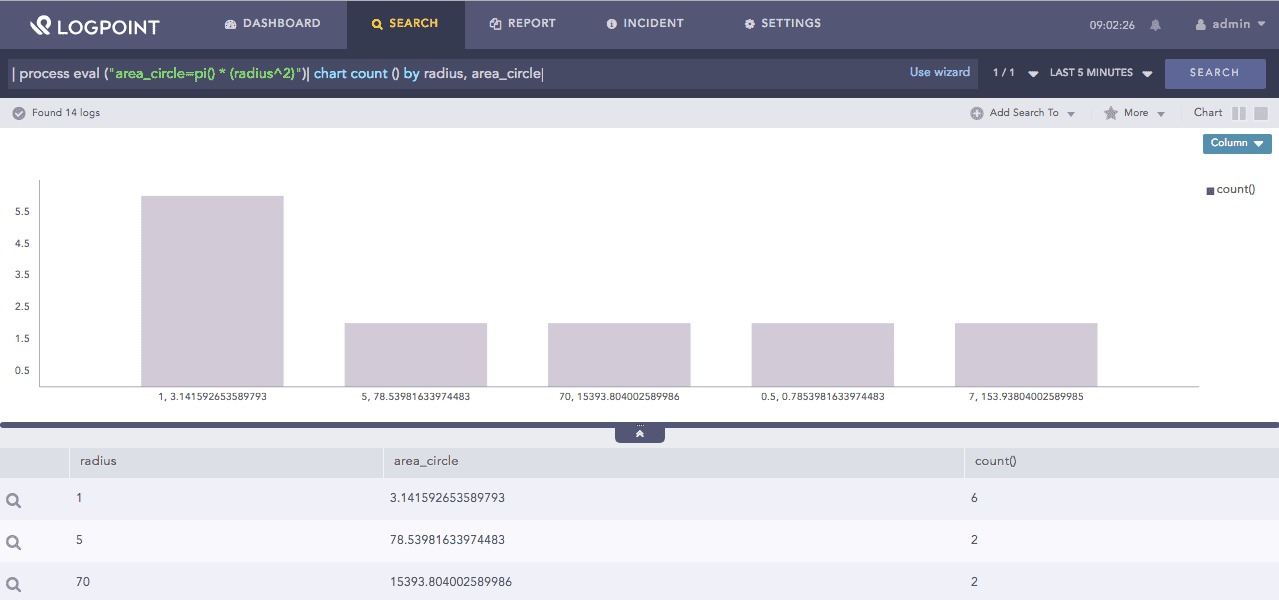
This function returns the first 12 digits of the value of pi. Unlike other functions, this function does not take any argument.
Syntax:
| process eval("identifier=pi()")
Example:
| process eval ("area_circle=pi() * (radius^2)")
| chart count () by radius, area_circle
The above example calculates the area of the circle where pi() gives the value of the mathematical constant (π). The function returns area in the area_circle identifier.
The chart count() command displays the count of the combination of radius and area_circle values as a chart and in a tabular form.
pi function
This function accepts a numeric value X as input and returns the square root of the numeric value.
Syntax:
| process eval("identifier=sqrt(X)")
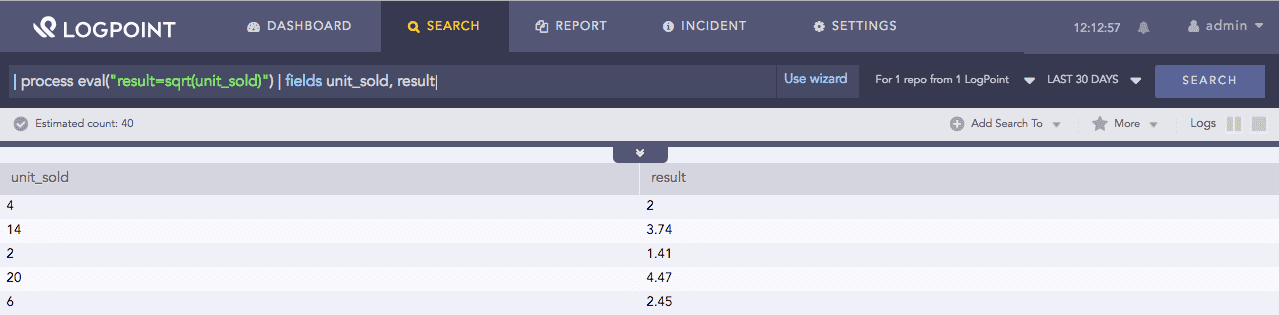
Example:
| process eval("result=sqrt(unit_sold)") | fields unit_sold, result
The above example returns the square root of the value of the unit_sold field in the unit_sold identifier.
The fields command displays the value of unit_sold and result in a tabular form.
Sqrt function
This function returns a random number ranging between 0 and 1. It does not take any argument. You can use this function in case you want a random number for any eval expression.
Syntax:
| process eval("identifier=random()")
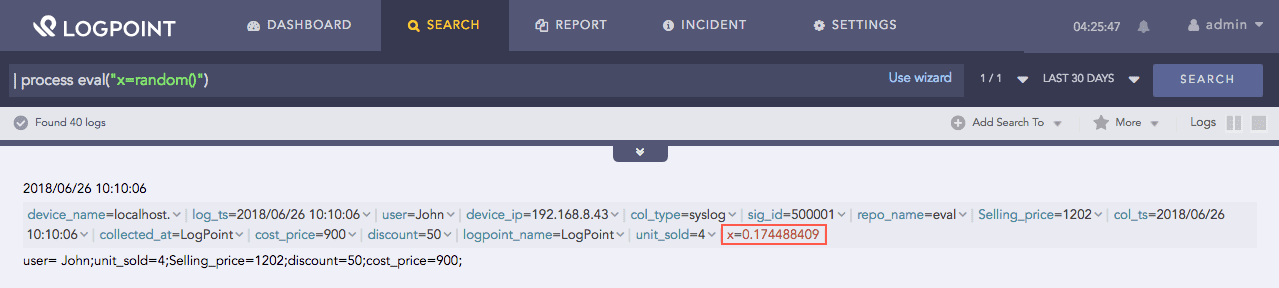
Example:
| process eval("x=random()")
The above example returns a random number between 0 and 1 in the x identifier.
Random function
This function accepts a numeric calculation X as input and returns a result with a significant amount of precision.
Syntax:
| process eval("identifier=exact(X)")
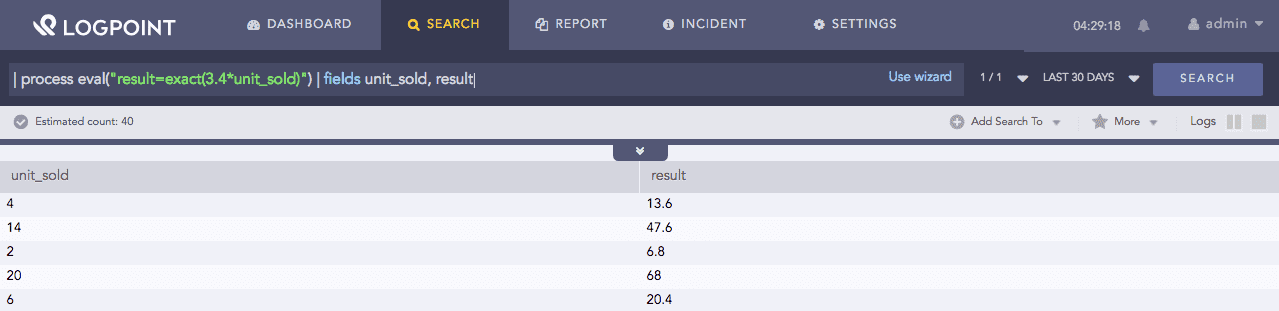
Example:
| process eval("result=exact(3.4*unit_sold)") | fields unit_sold, result
The above example returns the precise value of the arithmetic expression 3.4*unit_sold in the result identifier.
The fields command displays the value of unit_sold and result in a tabular form.
Exact function
This function accepts up to two numeric arguments, X and Y, as inputs. It then rounds the value specified in X by the amount of decimal specified in Y. Here Y is optional, and in case Y is not defined, it rounds the value of X to the nearest integer by default.
Syntax:
| process eval("identifier=round(X,Y)")
Example 1:
| process eval("x=round(12.233)")

Result: x=12
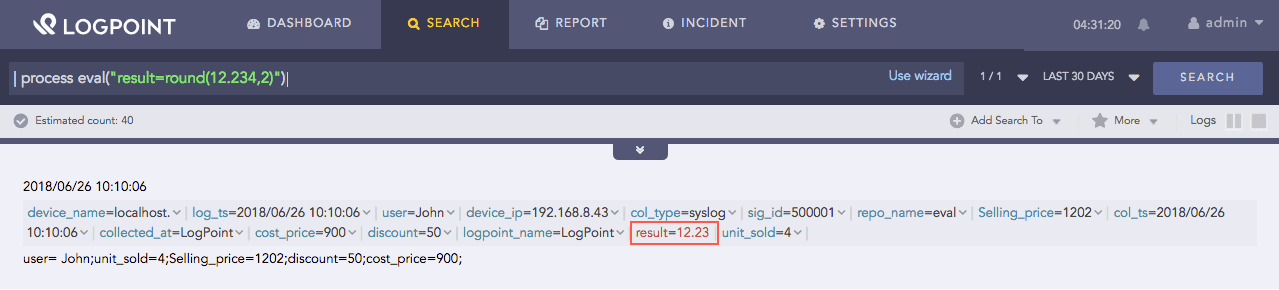
Example 2:
| process eval("result=round(12.234,2)")
The above example rounds up 12.234 to the hundredths (second decimal place) and returns its value in the result identifier.
Round function
This function accepts one numeric field X as input and rounds that number to the appropriate number of significant figures.
Syntax:
| process eval("identifier=sigfig(X)")
If X is of 1000th place, the function rounds it to the nearest 10.
Example 1:
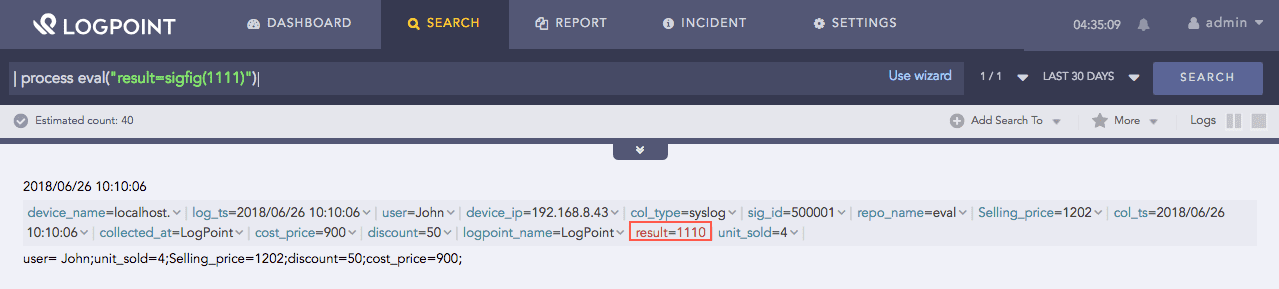
| process eval("result=sigfig(1111)")
The above example rounds up 1111 to the nearest 10 and returns its value, i.e., 1110 in the result identifier.
Sigfig function
If X is of 10000th place, the function rounds it to the nearest 100.
Example 2:
| process eval("x=sigfig(11111)")
The above example rounds up 11111 to the nearest 100 and returns its value, i.e., 11100 in the result identifier.
Note
This function accepts only integer value as input. It ignores the decimal numbers if provided and takes only the numbers before the decimal point. It does not round the number that is in the 10th and 100th place.